E-commerce
Research
UI
ECE Depot
How I simplified and improved the ordering process for engineering students when ordering parts for their projects.
Over 90% increase in Task Completion
Students were able to complete 100% of tasks on the new design vs. the old
Improving Confidence in Orders
Users felt secured when ordering due to feedback and error prevention

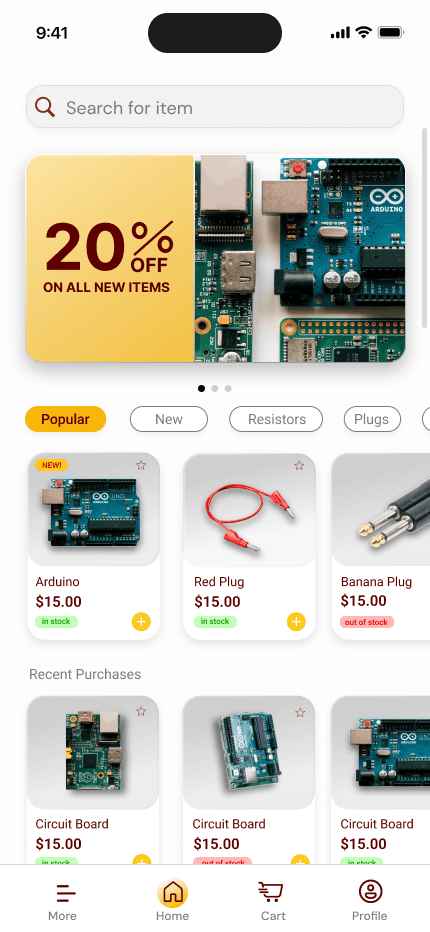
Accelerated the Ordering Process
With this new design, students took an avg. of 30 secs to order items
Increase in User Satisfaction
The students highly favored the new design!
My Role
UX/UI Designer & Researcher
Duration
6 months
Softwares
Miro, Figma, Photoshop
Overview
Overview
Overview
The ECE Depot app is a recreation of an existing store website for UMN students, specifically for electrical or computer engineering students, to purchase items for their projects. This project was created in order to make a user-friendly and efficient version of the site into a mobile application.
The ECE Depot app is a recreation of an existing store website for UMN students, specifically for electrical or computer engineering students, to purchase items for their projects. This project was created in order to make a user-friendly and efficient version of the site into a mobile application.

E-commerce
Research
UI
ECE Depot
How I simplified and improved the ordering process for engineering students when ordering parts for their projects.
Preliminary View
Efficient, user-friendly, and easy to navigate
Preliminary view
Includes user-friendly features to enhance the user experience while ordering parts on ECE Depot.
Preliminary View
Efficient, user-friendly, and easy to navigate
Preliminary view
Includes user-friendly features to enhance the user experience while ordering parts on ECE Depot.
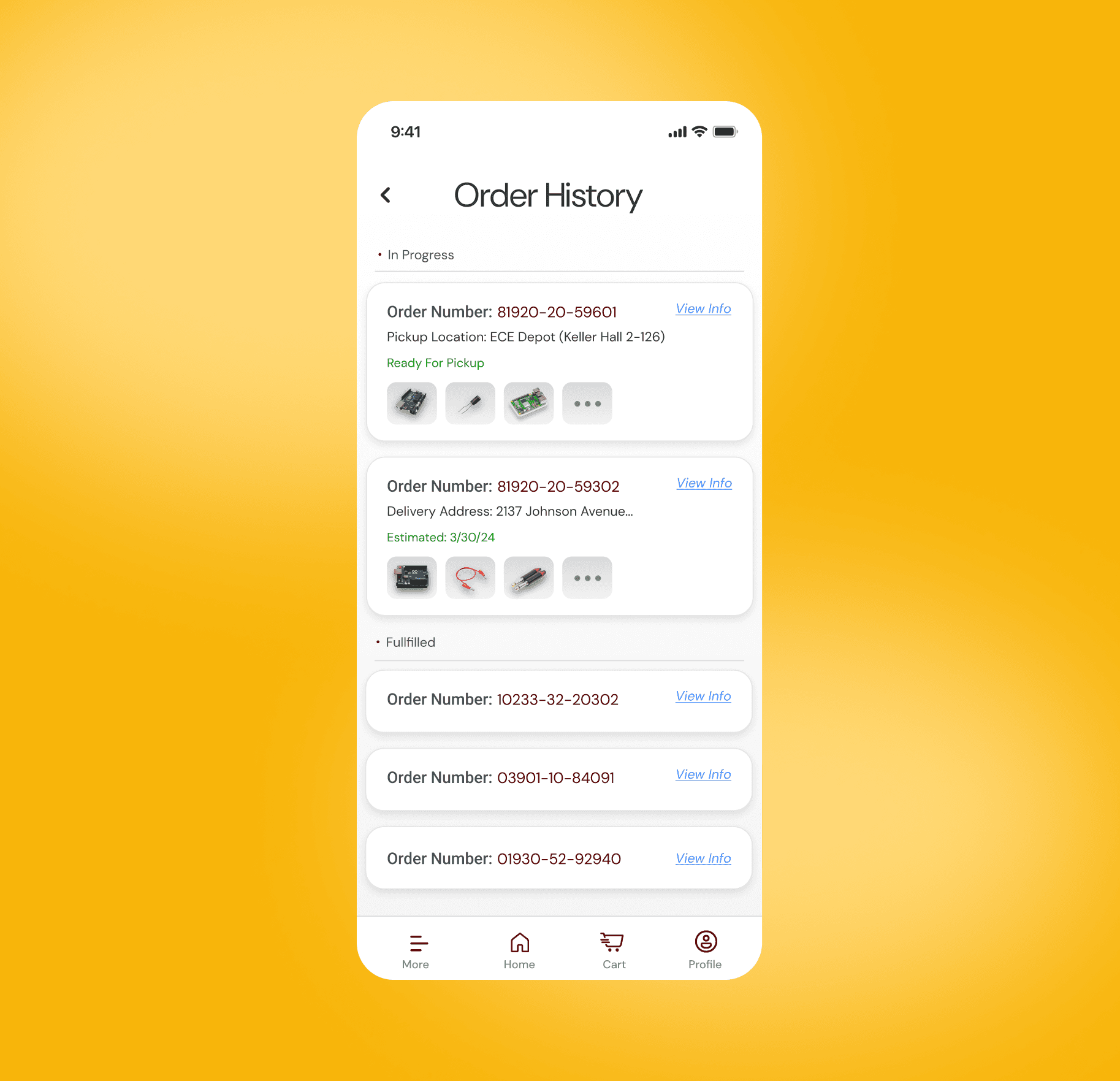
Data Collection
Kept track of previous orders allowing students to track, reorder, and cancel orders.
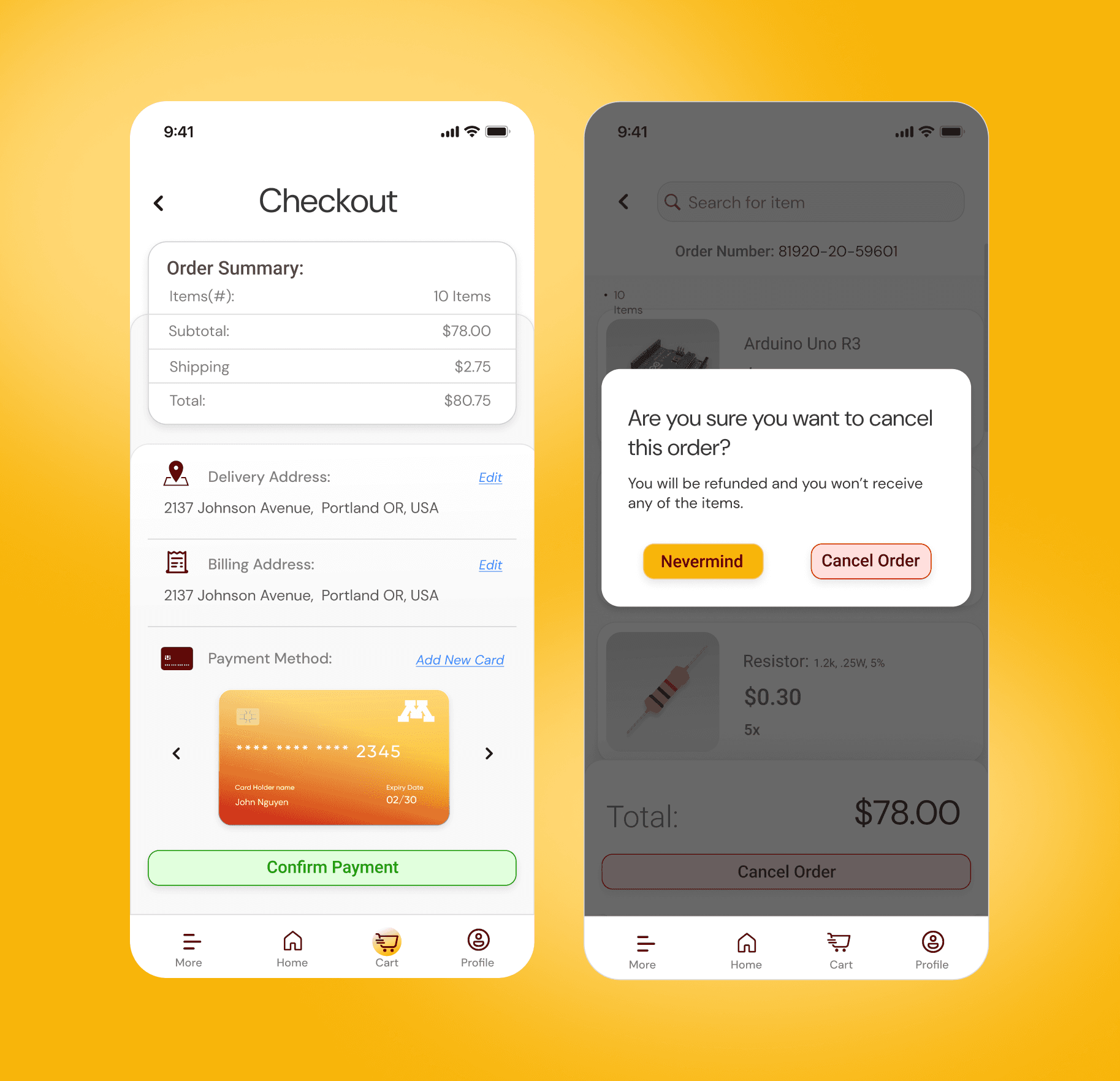
Multiple Options & Assurance
Introduced multiple payment options for students. Provided error prevention techniques.
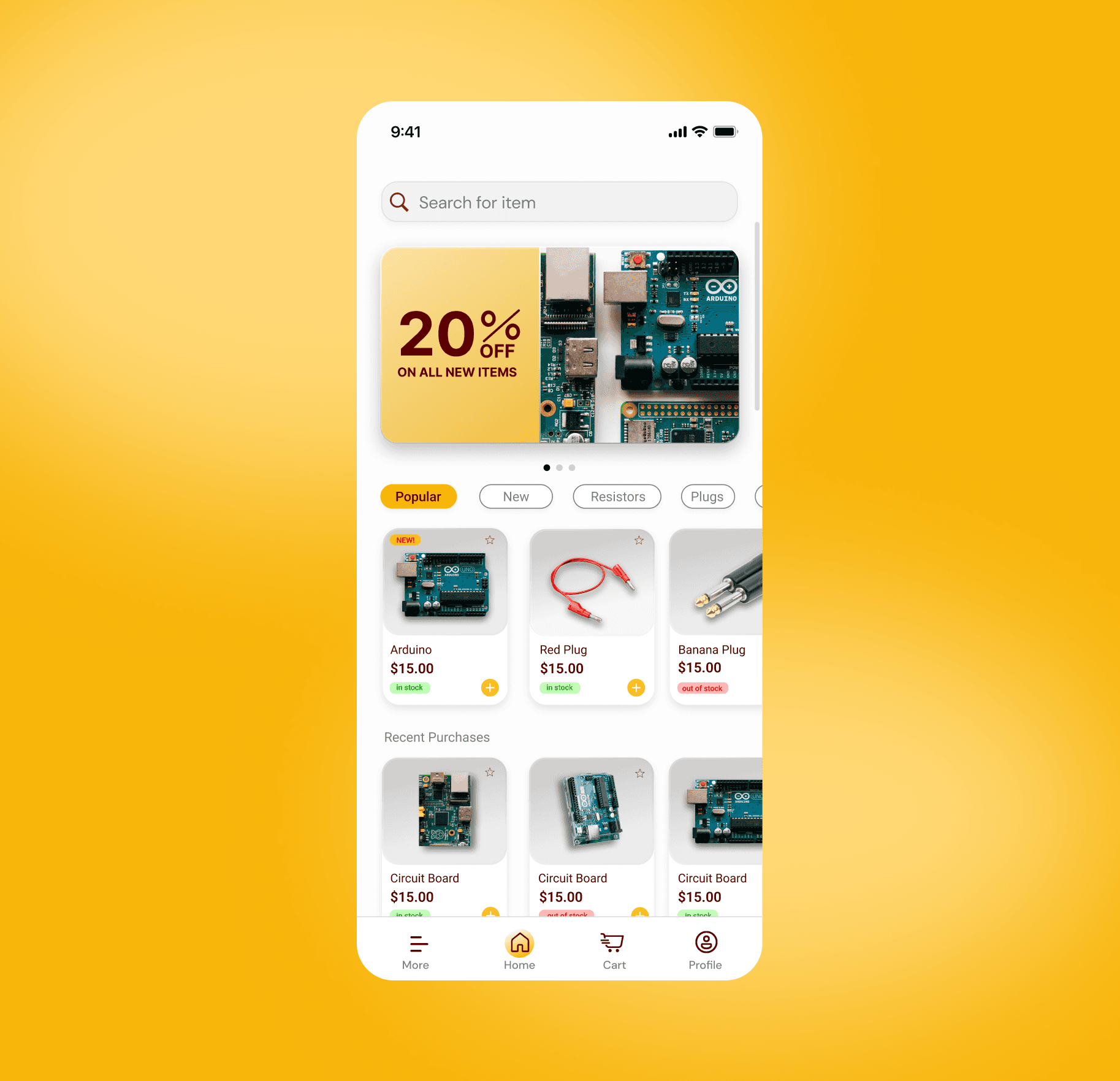
Aesthetics & Visuals
Utilized images to enhance user confidence. Created a design system to ensure cohesion.
Problem
Problem
The current ECE Depot site is not user friendly. Users have to go through a long inventory to find one item. Thus, being time consuming and confusing for the user. The website also lacks certain features such as photos of the items, payment options, and ways to tell whether an item is out of stock.
The current ECE Depot site is not user friendly. Users have to go through a long inventory to find one item. Thus, being time consuming and confusing for the user. The website also lacks certain features such as photos of the items, payment options, and ways to tell whether an item is out of stock.
Solution
Solution
Create a ECE Depot app which enhances the user experience by introducing features such as a search bar and filters to quickly locate items, clear item photos for better visualization, real-time stock availability indicators, and integrated payment options for a seamless checkout process.
Create a ECE Depot app which enhances the user experience by introducing features such as a search bar and filters to quickly locate items, clear item photos for better visualization, real-time stock availability indicators, and integrated payment options for a seamless checkout process.
Research
Competitive Analysis
Competitive Analysis
E
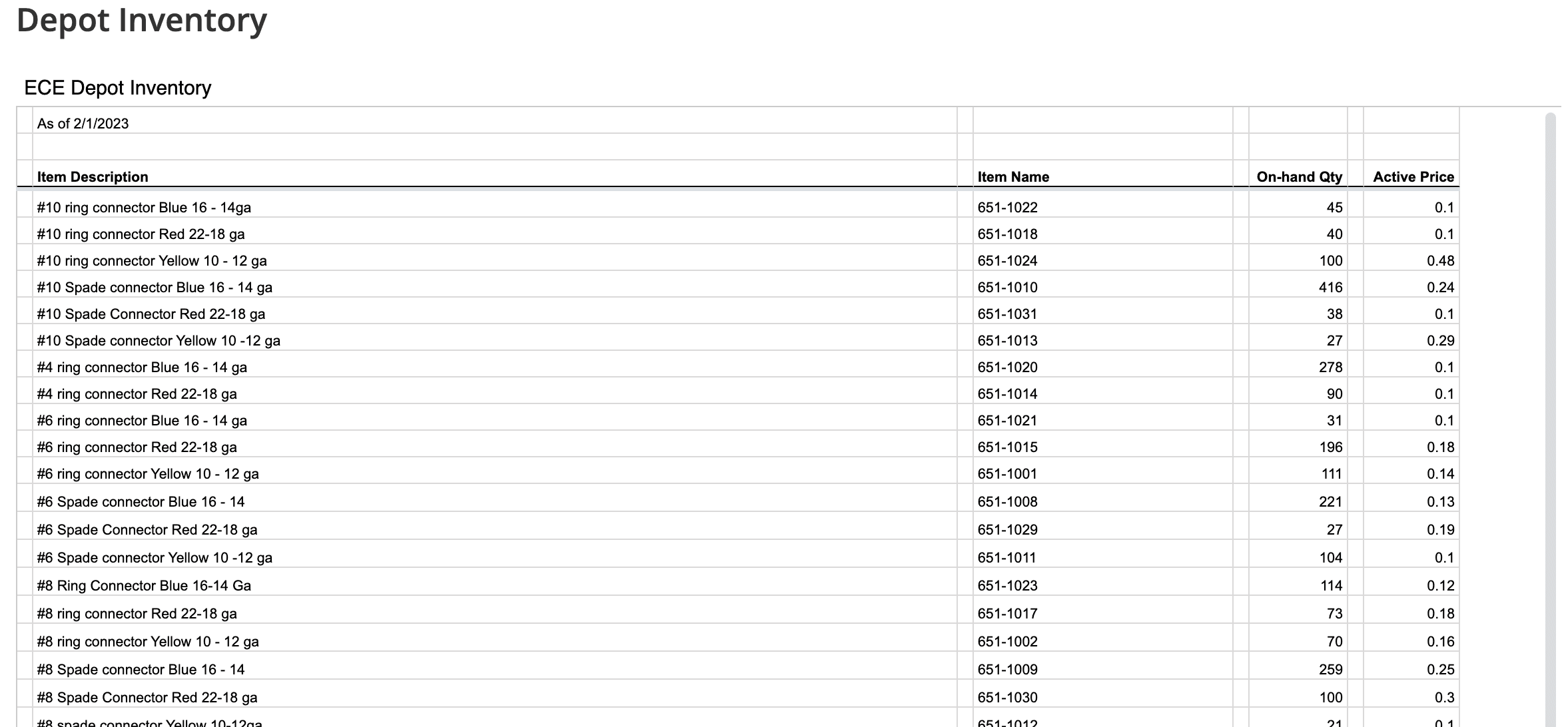
I conducted a competitive analysis of the existing ECE depot market. The current system is an extremely long inventory list in alphabetical order. Students have to either physically go through every item or use control+F to find their desired item.
I conducted a competitive analysis of the existing ECE depot market. The current system is an extremely long inventory list in alphabetical order. Students have to either physically go through every item or use control+F to find their desired item.
Includes detailed specifications of items
Contains item quantity
Describes colors of items
Strengths
Overwhelming due to amount of elements
Confusing terminology and jargon
Extremely time consuming
Weaknesses
Includes detailed specifications of items
Contains item quantity
Describes colors of items
Strengths
Overwhelming due to amount of elements
Confusing terminology and jargon
Extremely time consuming
Weaknesses
User Persona
Qualitative Research
Observing the users
E
Target User
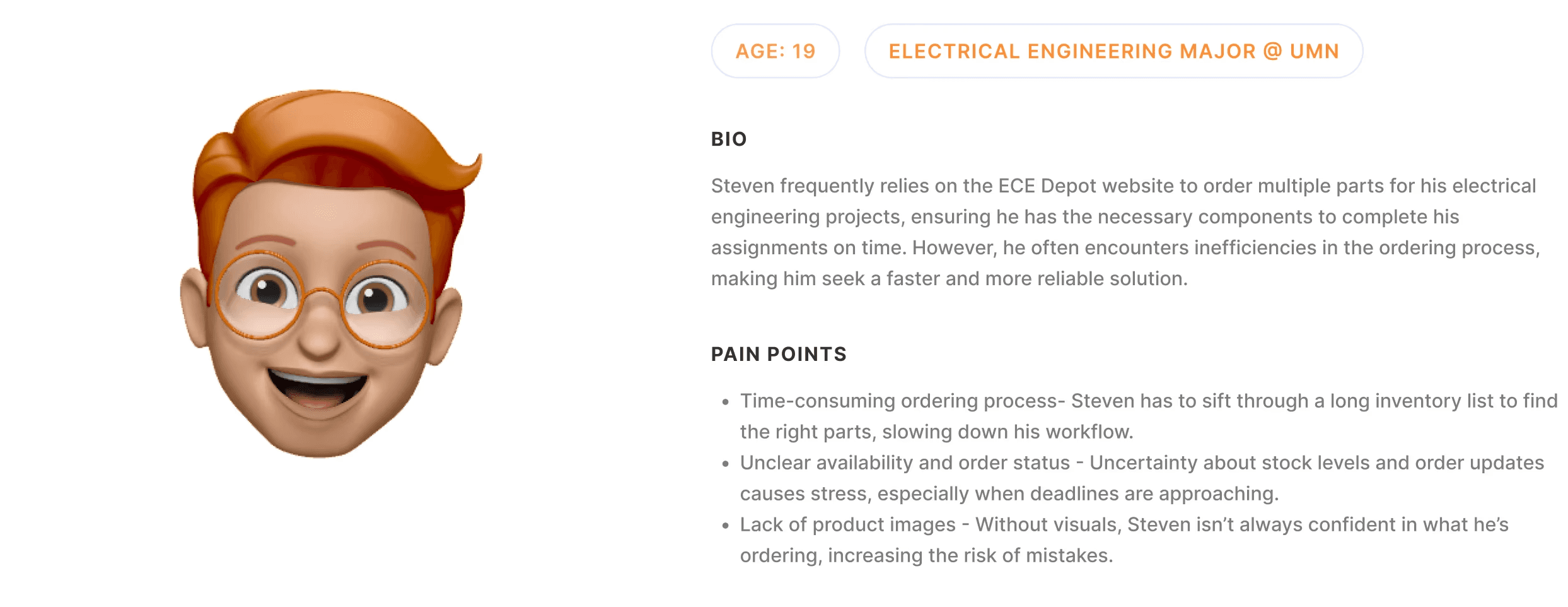
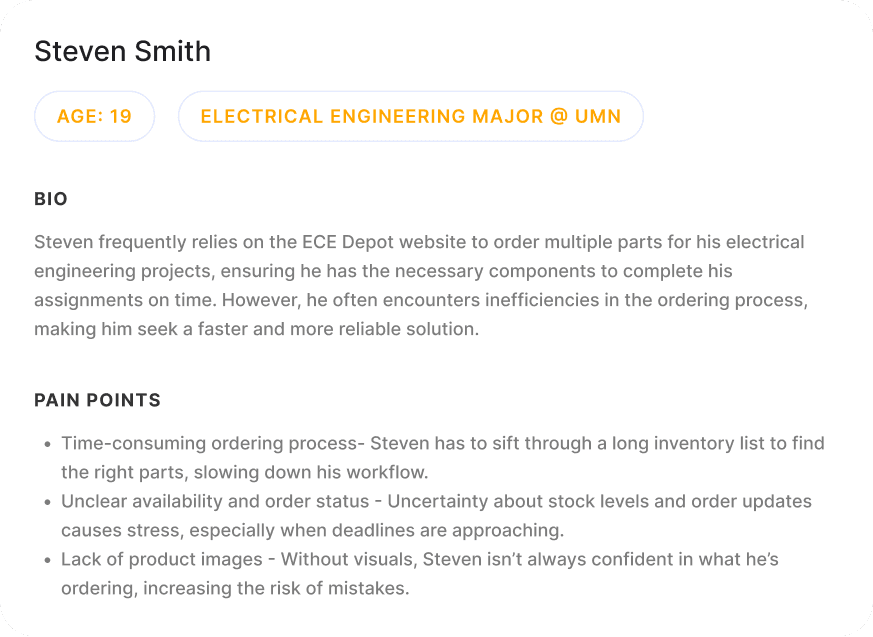
Students at the University of Minnesota studying electrical or computer engineering. Our users need to buy items for their class projects using ECE depot. They want a quicker and more reliable way to purchase their items than the current system.
Method (Observation)
A group of electrical and computer engineering students were observed while completing a task. The task was to complete an order using the current ECE Depot website. While creating the order, the users were told to express their thought process out loud. After completing the observation, users were then interviewed about their experience.
Target User
Students at the University of Minnesota studying electrical or computer engineering. Our users need to buy items for their class projects using ECE depot. They want a quicker and more reliable way to purchase their items than the current system.
Method (Observation)
A group of electrical and computer engineering students were observed while completing a task. The task was to complete an order using the current ECE Depot website. While creating the order, the users were told to express their thought process out loud. After completing the observation, users were then interviewed about their experience.
User Persona
Observing the users
Qualitative Research
Comments
Mock Order Feedback
Mock Order Feedback
Honest Feedback from Our Users
Honest Feedback from Our Users
Current ECE Depot System
The exhaustingly long inventory is so incredibly time consuming. This makes me not want to order online!!! I'm also worried about ordering the wrong item because the products are so crammed together.

Interviewee #1
EE Major
Overwhelmed when ordering
It’s difficult to tell which item I need since there are too many options.

Interviewee #2
CompE Major
Lack of visuals
There are no pictures of the item in the inventory list. I don’t know if I’m buying the right thing!!!

Interviewee # 3
EE Major
Items ordered wrong
I would rather not use this site due to the possibility of ordering an item wrong. I prefer e-commerce sites like Amazon or Digikey!

Interviewee #4
EE Major

Including categories for the different types of items would be extremely helpful.

Interviewee #5
CompE Major
Affinity Mapping
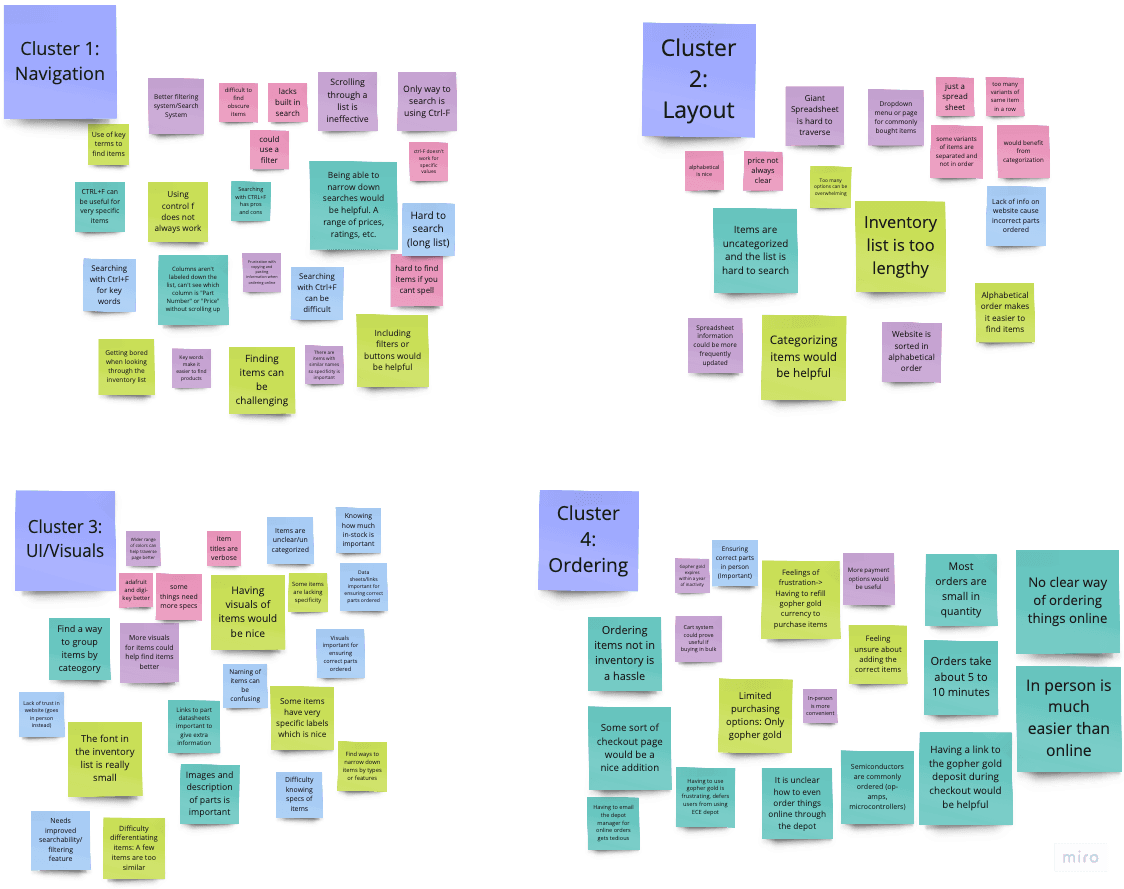
After conducting several interviews, we categorized the feedback from our interviewees into four sub-categories: navigation, layout, UI/visuals, and ordering. Navigation focused on issues users encountered with the system's wire flow. Layout addressed frustrations related to the organization of features on the screen. UI/visuals encompassed areas where users suggested improvements for better aesthetics. Finally, ordering included feedback provided while users were completing the task of ordering an item.
Affinity Mapping
After conducting several interviews, we categorized the feedback from our interviewees into four sub-categories: navigation, layout, UI/visuals, and ordering. Navigation focused on issues users encountered with the system's wire flow. Layout addressed frustrations related to the organization of features on the screen. UI/visuals encompassed areas where users suggested improvements for better aesthetics. Finally, ordering included feedback provided while users were completing the task of ordering an item.
Prototyping
Design Process
Design Process
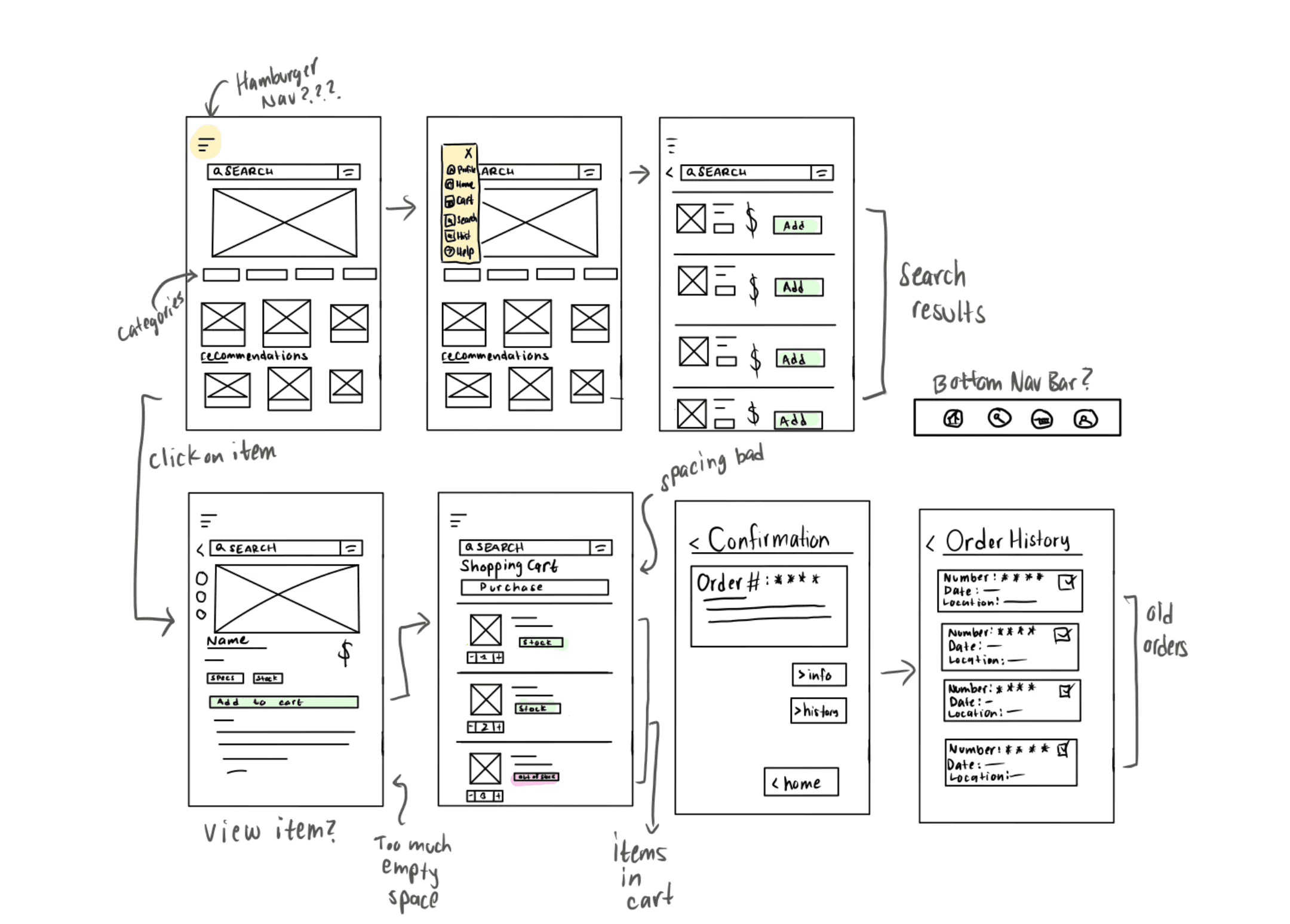
Starting our visual process….
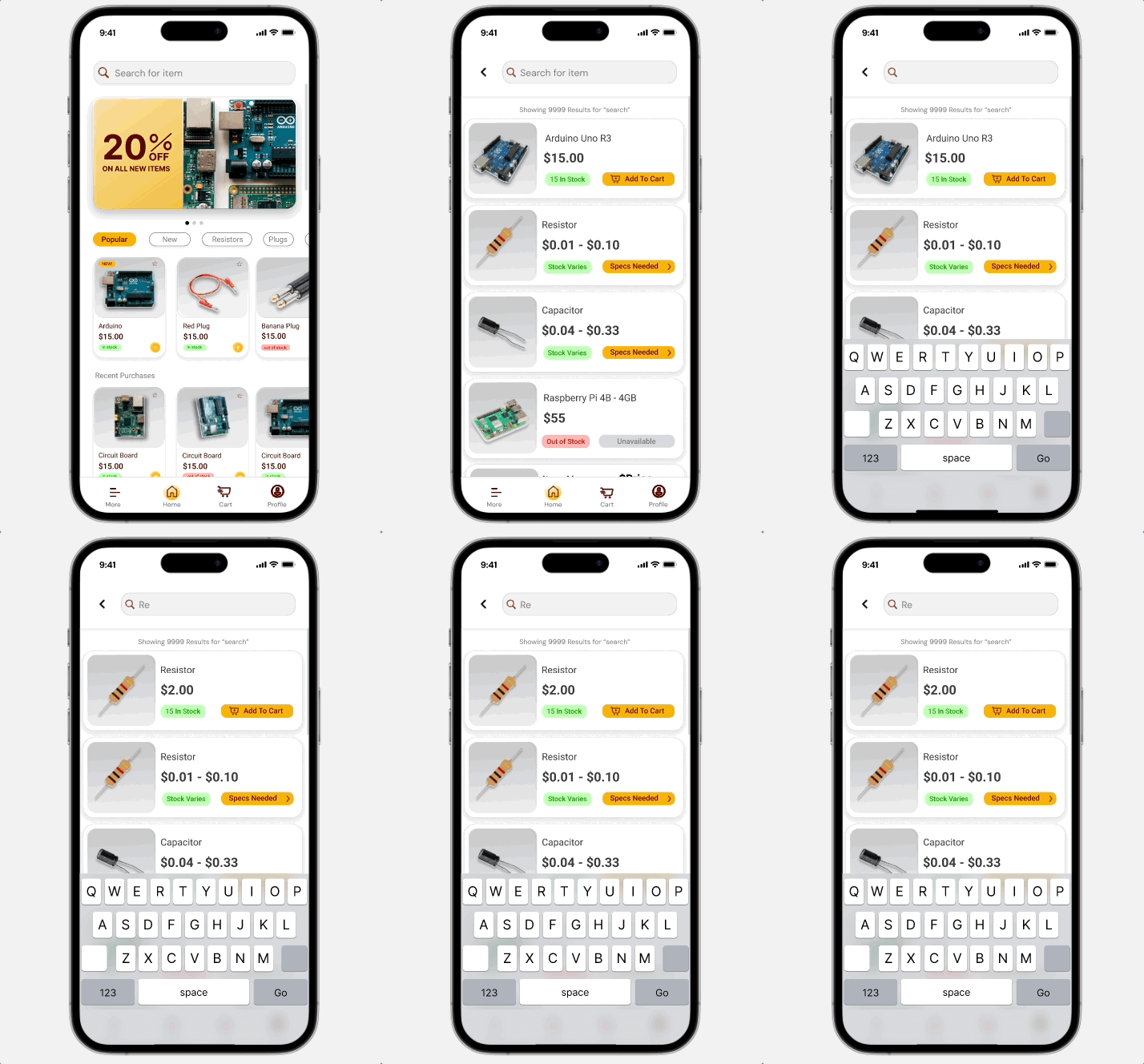
We wanted a consistent search bar so our user always had the option of looking up an item. It was also important to incorporate features that give them multiple payment options and tells them if an item is in stock.
We wanted a consistent search bar so our user always had the option of looking up an item. It was also important to incorporate features that give them multiple payment options and tells our user if an item is in stock.
Heuristic Evaluations
Heuristic Evaluations
E
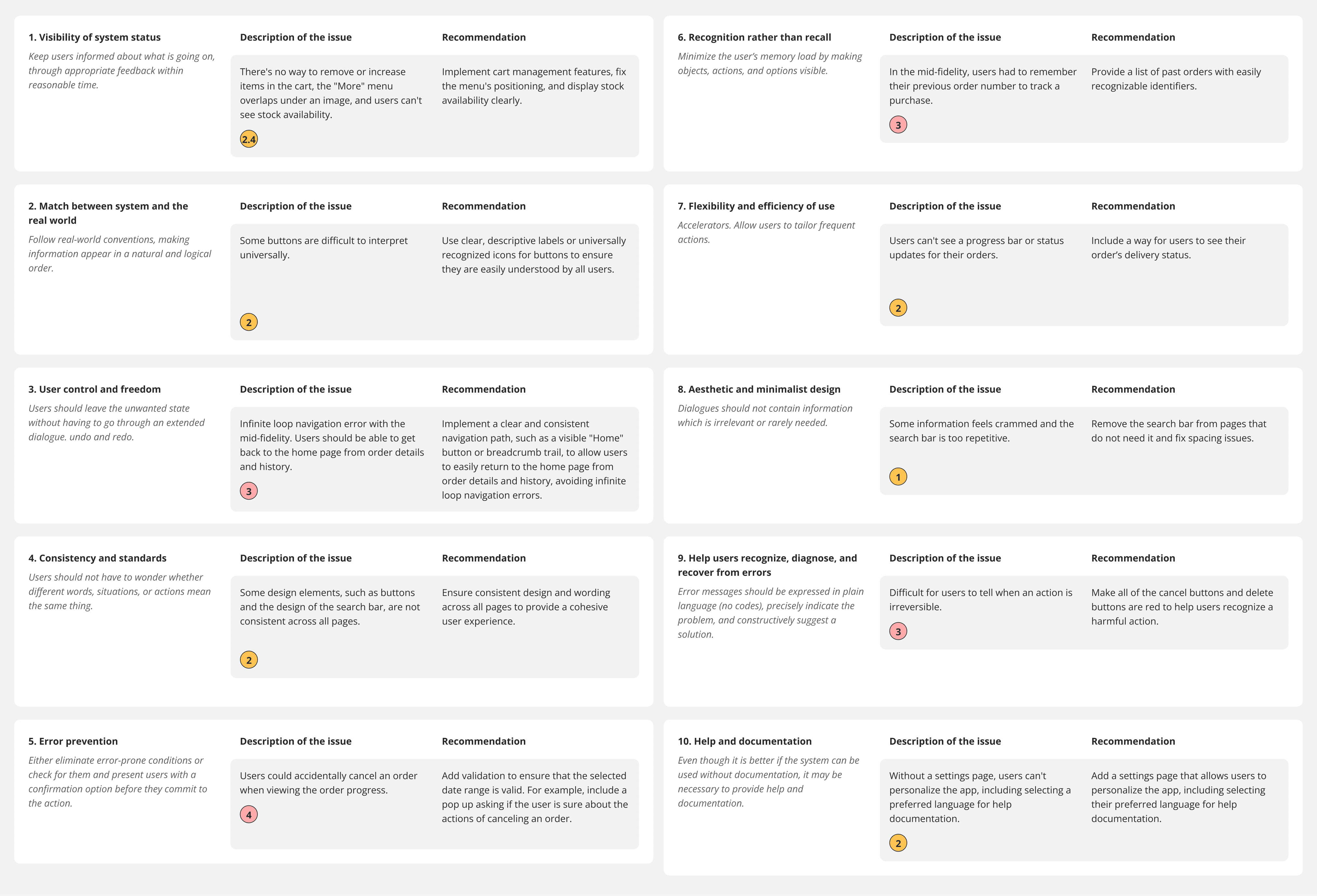
The mid-fidelity prototype was assessed using Nielsen's 10 general principles to ensure accessibility and user-friendliness. During the evaluation, typical user scenarios were tested, including a student viewing their purchase history, ordering items for a project, completing an order and checking out, and adding an item to the cart. These scenarios were used to conduct the heuristic evaluations, and the findings are presented below. The prototype was then refined to address these issues, enhancing the overall user experience.
The mid-fidelity prototype was assessed using Nielsen's 10 general principles to ensure accessibility and user-friendliness. During the evaluation, typical user scenarios were tested, including a student viewing their purchase history, ordering items for a project, completing an order and checking out, and adding an item to the cart. These scenarios were used to conduct the heuristic evaluations, and the findings are presented below. The prototype was then refined to address these issues, enhancing the overall user experience.
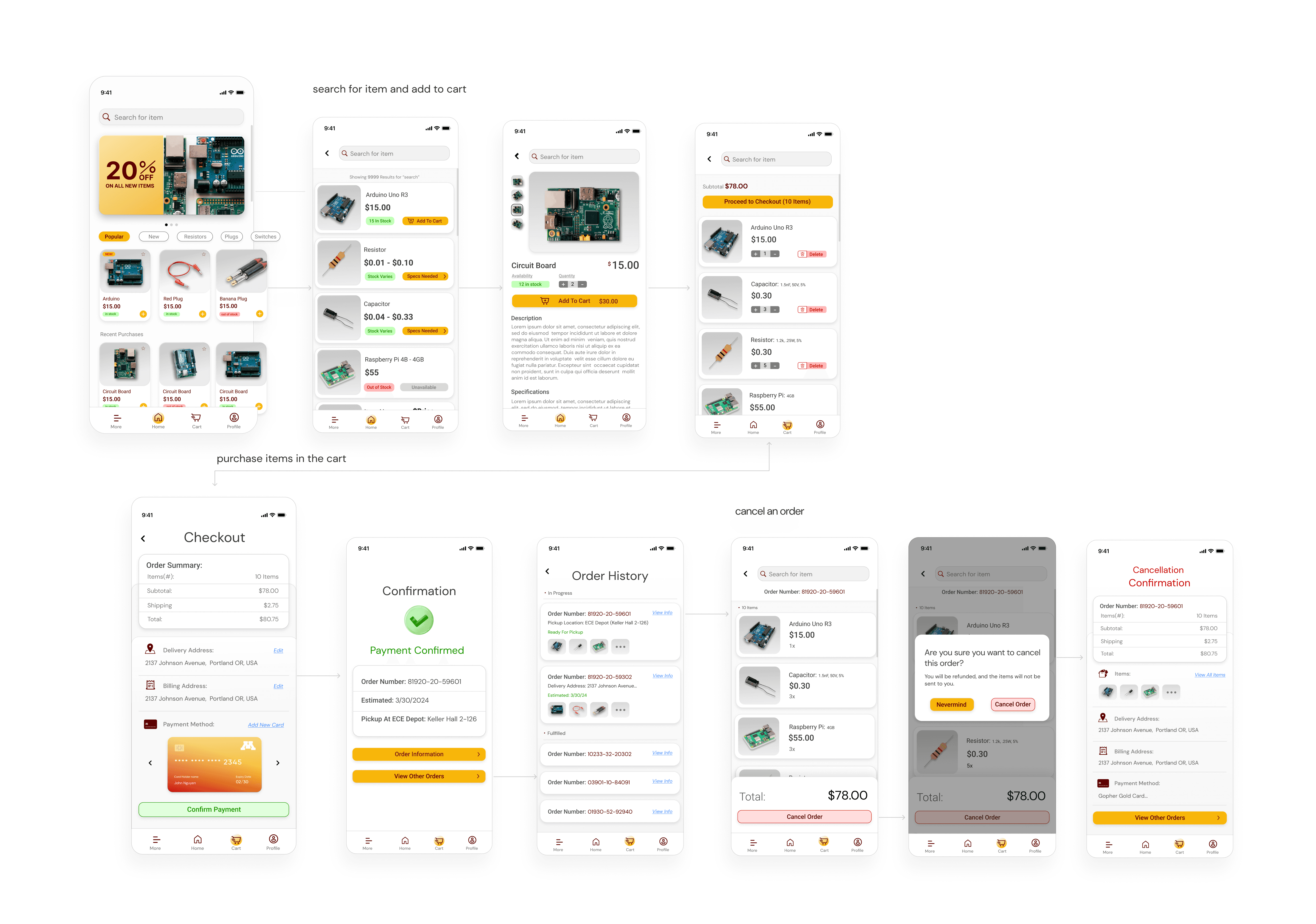
ECE Depot Screens
ECE Depot Screens
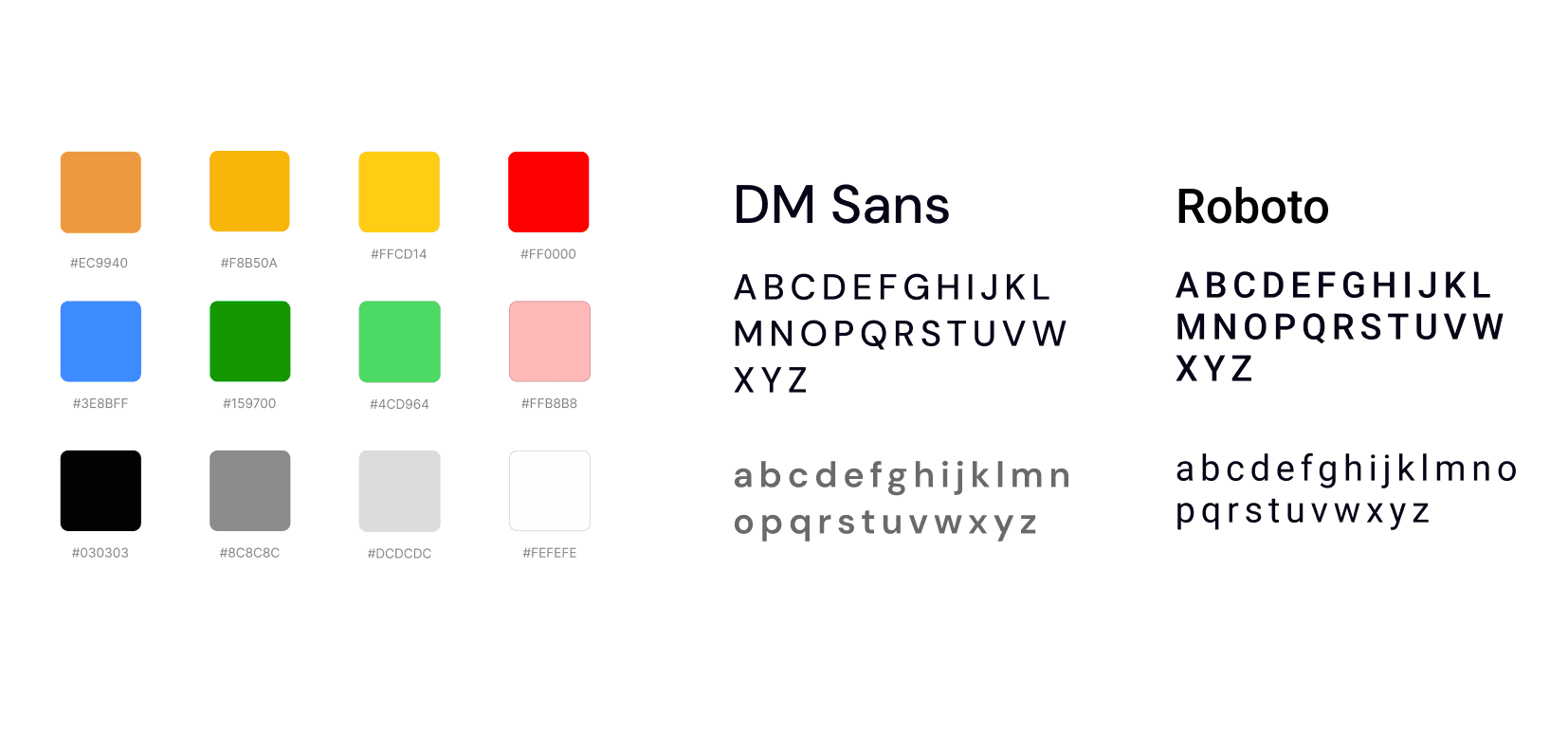
Style Guide
Style Guide
User Testing
User Testing
E
The participants in our initial observational user tests completed five scenarios with our updated prototype and rated their satisfaction on a scale from one (worst) to ten (best).
Viewing an item= Errors: 1, Rate: 9/10
Creating an order = Errors: 3, Rate: 9/10
Deleting an item = Errors: 0, Rate: 8/10
Canceling an order = Errors: 1, Rate 9/10
Navigating to the help page = Errors: 0, Rate: 9/10
The participants in our initial observational user tests completed five scenarios with our updated prototype and rated their satisfaction on a scale from one (worst) to ten (best).
Viewing an item= Errors: 1, Rate: 9/10
Creating an order = Errors: 3, Rate: 9/10
Deleting an item = Errors: 0, Rate: 8/10
Canceling an order = Errors: 1, Rate 9/10
Navigating to the help page = Errors: 0, Rate: 9/10
The participants in our initial observational user tests completed five scenarios with our updated prototype and rated their satisfaction on a scale from one (worst) to ten (best).
Viewing an item= Errors: 1, Rate: 9/10
Creating an order = Errors: 3, Rate: 9/10
Deleting an item = Errors: 0, Rate: 8/10
Canceling an order = Errors: 1, Rate 9/10
Navigating to the help page = Errors: 0, Rate: 9/10
The participants in our initial observational user tests completed five scenarios with our updated prototype and rated their satisfaction on a scale from one (worst) to ten (best).
Viewing an item= Errors: 1, Rate: 9/10
Creating an order = Errors: 3, Rate: 9/10
Deleting an item = Errors: 0, Rate: 8/10
Canceling an order = Errors: 1, Rate 9/10
Navigating to the help page = Errors: 0, Rate: 9/10
Comments
Insights from students after user testing
1
Interactivity
Students liked the interface, but they expressed desires for an interactive prototype that would allow them to immerse themselves even further.
2
Item Removal Feedback
Students wanted to remove an item from their cart and receive visual feedback while doing so.
3
Order Information
Students expressed how they wanted to see the date of an order to help them understand context and trust the system.
1
Interactivity
Students liked the interface, but they expressed desires for an interactive prototype that would allow them to immerse themselves even further.
2
Item Removal Feedback
Students wanted to remove an item from their cart and receive visual feedback while doing so.
3
Order Information
Students expressed how they wanted to see the date of an order to help them understand context and trust the system.
Final Design
Final Design
Final Results
Final Results
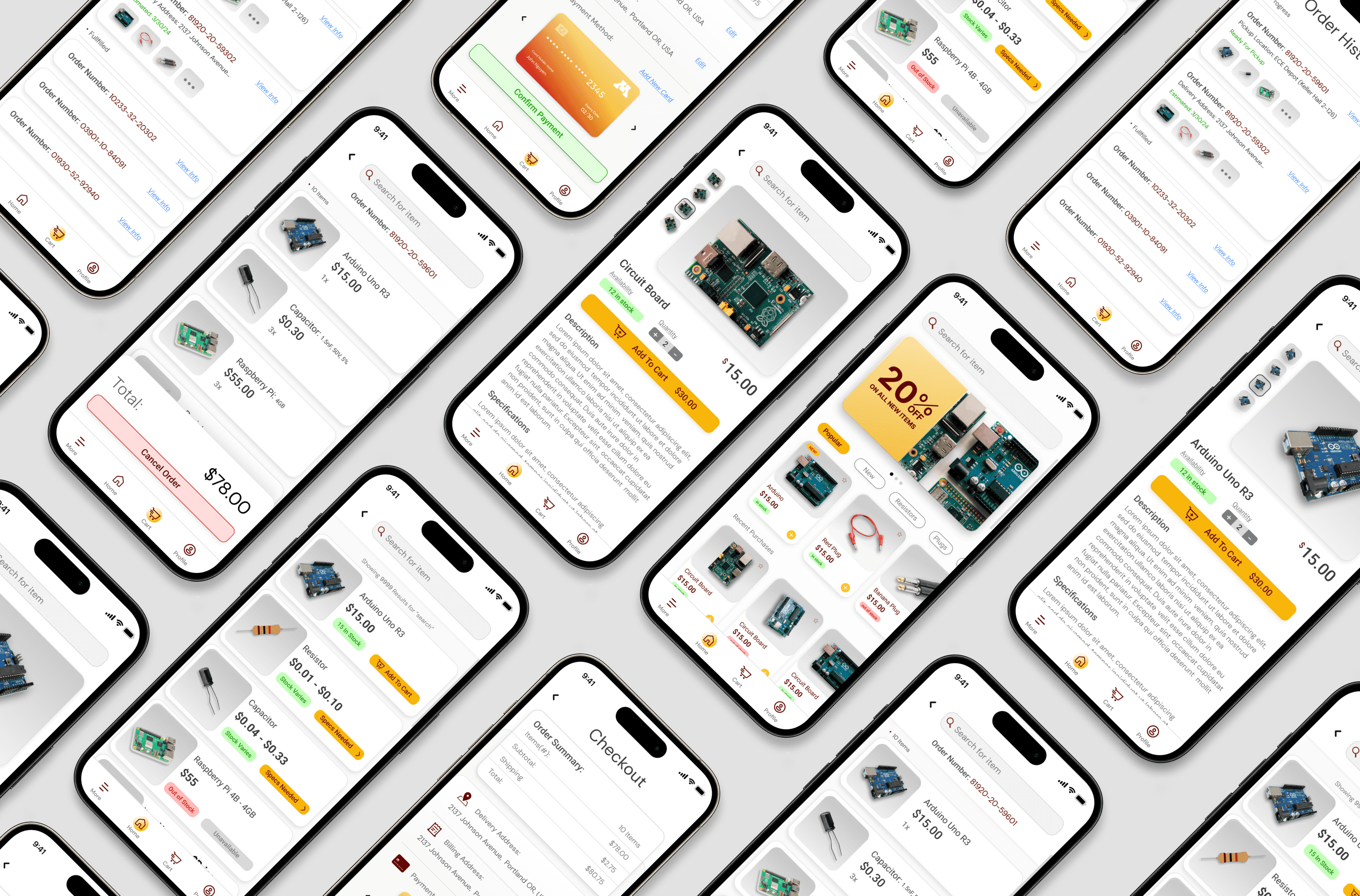
Overall our prototype had very positive feedback from our users. They preferred using the ECE Depot app over the current ECE Depot system. Many comments were made complimenting the UI, animations, and organization.
Overall our prototype had very positive feedback from our users. They preferred using the ECE Depot app over the current ECE Depot system. Many comments were made complimenting the UI, animations, and organization.
What I Learned
What I Learned
I learned ways to effectively use quantitative and qualitative data in order to improve our users experience. Conducting behavioral observations is a great way to understand issues that might've been overlooked!
I learned ways to effectively use quantitative and qualitative data in order to improve our users experience. I also learned that conducting behavioral observations is a great way to understand issues that might've been overlooked!